Cross-platform desktop automation through accessibility APIs
xa11y provides a Playwright-style API for driving desktop applications through their accessibility tree on Windows, macOS, and Linux. It’s a Rust library with additional Python and JavaScript bindings.
The library provides a foundation for desktop testing, automation, and accessibility software. Additionally, these accessibility APIs are a more robust mechanism for building computer use agents, which until recently have relied primarily on running vision models on screenshots (flaky, slow, token heavy).
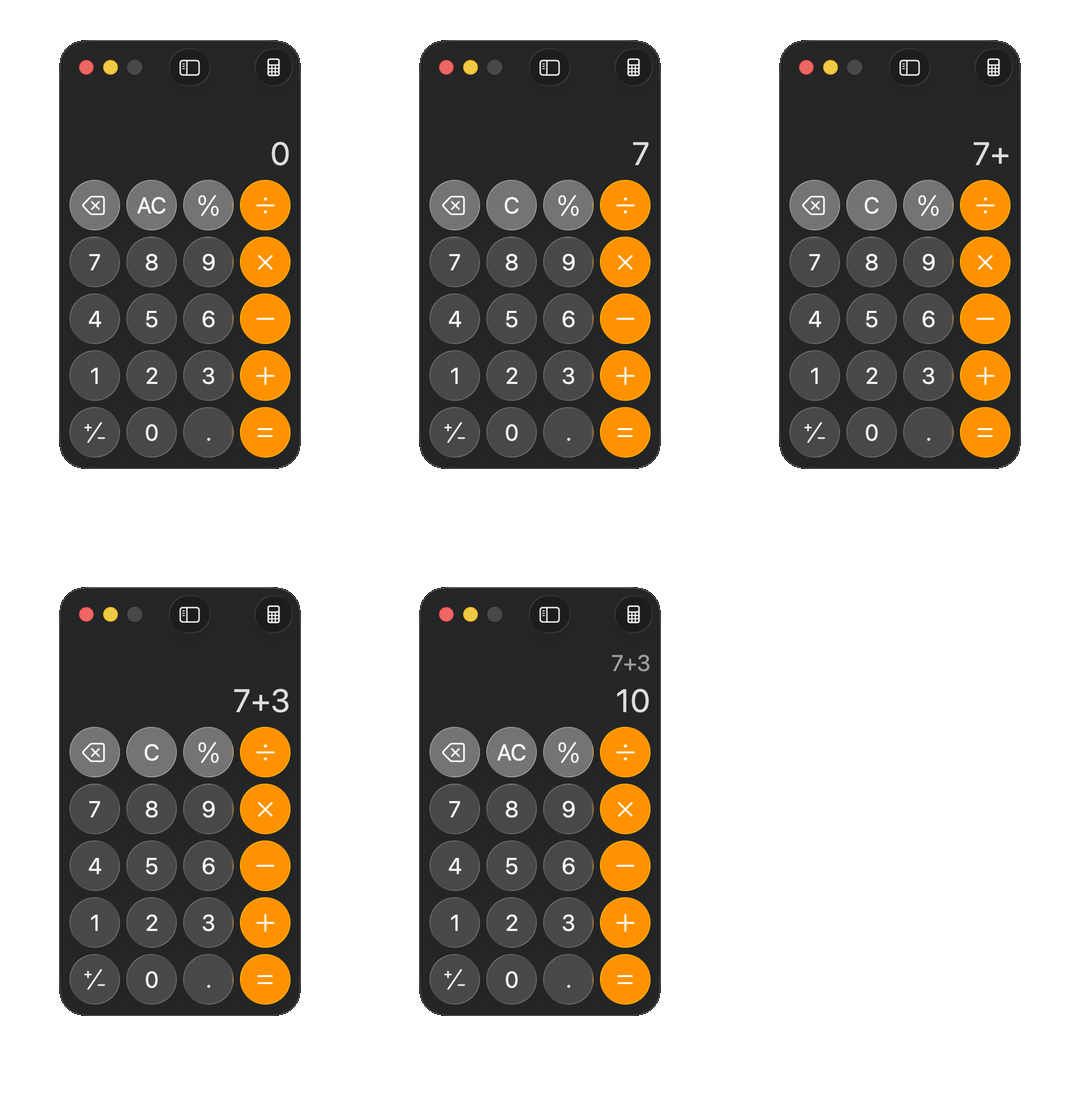
The simple interface is modeled after Playwright and CSS selectors. For example, to drive the macOS Calculator app:
use xa11y::*;
use std::time::Duration;

let calc = App::by_name("Calculator", Duration::from_secs(5))?;
calc.locator("button[name='7']").press()?;
calc.locator("button[name='+']").press()?;
calc.locator("button[name='3']").press()?;
calc.locator("button[name='=']").press()?;

let display = calc.locator("static_text").first().element()?;
assert_eq!(display.data().value.as_deref(), Some("10"));
Under the hood, the Cargo workspace splits along platform lines: xa11y-core holds the shared types and selector engine; xa11y-windows, xa11y-macos, and xa11y-linux each wrap one platform’s FFI (COM via the windows crate, Core Foundation via core-foundation, and D-Bus via zbus); and the top-level xa11y crate conditionally compiles the right backend per target. The Python and Node packages are separate crates layered on top via pyo3 and napi-rs. Isolating each FFI surface in its own crate keeps unsafe and platform cfgs out of xa11y-core and lets each backend evolve against its own native idioms.
The library wrangles a lot of complexity to produce this simple interface. Each platform has its own unique accessibility system - UIA on Windows, AXUIElement on macOS, and AT-SPI2 on Linux - which have different semantics, query patterns, and performance. Accessibility trees change as an interface rerenders, making it challenging to route an action to the right element.
Cross-platform differences
Every platform has accessibility APIs that are conceptually similar at a high level: desktop UIs are represented by trees of elements which have various properties and which can accept updates and actions. The Calculator snippet above, for instance, walks a tree that looks roughly like this:
application "Calculator"
└── window "Calculator"
    ├── static_text "10"
    └── group
        ├── button "7"
        ├── button "8"
        ├── button "9"
        ├── button "+"
        ├── button "3"
        ├── button "="
        └── ... (other digits and operators)
Up close though, the APIs diverge.
Windows UIA has the most structured data model. Each UI element is assigned a role from a fixed list and supports a set of actions (“control patterns”) also from a fixed list. Because roles and actions are standardized enums, the elements are easier to programmatically interpret. For reading accessibility data, Windows can prefetch a whole subtree in a single call (FindAllBuildCache + CacheRequest) which is quick and efficient.
On macOS, the AXUIElement data model is more flexible. UI elements are identified by role and subrole strings (e.g. role “AXButton” with subrole “AXDisclosureTriangle”). There are conventions for what these strings should be (e.g. most start with “AX”, buttons are usually “AXButton”), but the conventions are not enforced. As a result, looking at the accessibility data we can ask, “Is this element a button?” and evaluate some heuristics, but ultimately the data is untyped and can contain any value from the desktop application.
AXUIElements accept actions in two ways. Some actions like updating the text in an input box are done as a property update on the element. Others like pressing a button are done by invoking an action. Like roles, action names are untyped strings with conventions but no rules.
When reading data, macOS does not have an API for reading the entire tree. Instead, each element attribute needs to be individually read. Fortunately, these calls are relatively quick and attributes for a single element can be read in a single batched AXUIElementCopyMultipleAttributeValues call.
Linux’s AT-SPI2 system sits in between Windows UIA’s structures and macOS’s flexibility. AT-SPI2 has strong conventions for element roles, which are modeled as an enum (with a registration mechanism for custom roles), while action names are untyped strings with conventional values like “click” or “press”, but no enforced enum. Most UIs use standard role and action names, but we still need a way to handle custom ones. The main challenge I found with AT-SPI2 is its performance. Windows UIA supports reading a whole a11y tree at once and macOS’s AXUIElement API allows batch reads, but AT-SPI2 requires individual API calls for each property on an element. Additionally the calls go over the system-wide D-Bus interface which on my machine had a latency of several milliseconds. Reading the whole a11y tree for a real application could take multiple seconds - far too slow for a single step in an automation flow.
Design decisions:
- Make honest abstractions where we can, add escape hatches where we can’t. Common patterns like reading elements, adding text to inputs, and clicking buttons have clear, natural abstractions across platforms. Some platform differences cannot be reconciled though - for example, macOS subroles let an app distinguish a search field (role
AXTextField, subroleAXSearchField) from a plain text field, but Windows and Linux have no equivalent. For these advanced use cases, we’ll preserve the raw platform data and pass it through so library consumers can reference it without having to touch the platform’s API directly. - Build on existing design. Use Windows UIA as the starting point for the abstraction because it has the most rigid types.
- No fallbacks. With the flexibility of macOS and Linux APIs, it’s tempting to take a best-effort approach to matching actions or roles to canonical values. For example, on macOS mapping a press() command to a “press” or “click” or “invoke” action depending on what the element advertises. But each of these convenience fallbacks can fail for some cases and obscure what the library is actually doing.
- Evaluate queries per platform. Each platform has its own optimized query evaluation logic. In earlier iterations, I read an app’s entire accessibility tree first then ran a simple, platform-agnostic filter on the tree to get the final results. It worked great on Windows, had passable performance on macOS, but was unbearably slow on Linux for apps with large trees. To fix the performance, the macOS and Linux query evaluators fetch only the specific data they need to evaluate the next step in the query. For example, if the selector is
button[name='7'], we’ll only read the name and role for each element in the tree as we search. The queries are more complicated to execute, but it fixes the Linux performance issue.
Thrashing trees
When a desktop app renders its UI, an element that looks visually stable might actually be replaced each time the layout shifts or even on every frame (in the case of immediate mode UI frameworks like egui). Each platform has its own version of a stable element reference, but they are opt-in or best effort, not a reliable mechanism for finding the same element twice. Reliably resolving elements is especially important for testing and automation. We want to do something like, “Click the Ok button,” but in reality that’s implemented as two operations - find a button labelled “Ok” and click that button - and the button instance may be replaced between the query and the action, even if its replacement is identical.
Additionally, UIs have some real, observable delays which complicate simple sequences. For example, to open a dropdown menu and click the second item, at a low level we need to actually open the select menu, then wait for the menu to open, then click the second item. Longer sequences can become littered with polling loops and retries, and forgetting one can result in a flaky test or broken process.
Design decision:
- Use lazily evaluated locators, and add a waiting mechanism by default. The locator pattern is borrowed from Playwright, which effectively addresses the same challenges on web UIs. A locator describes how to find an element, but the specific element itself is re-resolved every time we take an action or read an element’s data. The resolution process also retries for a short period of time to allow the UI to settle.
Bring it all together
The result of this work is xa11y - a cross-platform library that provides a consistent interface for working with accessibility APIs across platforms. It works out-of-the-box as a desktop application testing tool and is being successfully used by several real world projects. It’s also a solid foundation for building desktop automation tools and computer-use agents (for example, agent-desktop.dev).
Try it out!
- Rust:
cargo add xa11y - Python:
pip install xa11y - Node:
npm install @crowecawcaw/xa11y - Docs: xa11y.dev